Keyboard clicks
Type freely without sharing every keystroke.
Free AI noise cancellation for Chrome. Remove keyboard clicks, barking dogs, traffic, and background chatter from calls, streams, and recordings—in real time.
 Noise Cancelling App
Noise cancellation
Your voice, front and center
One clear voice across your favorite platforms
You can’t always control your surroundings. Noise Cancelling App identifies distracting sounds and keeps your voice front and center, wherever you’re talking from.
Type freely without sharing every keystroke.
Keep surprise interruptions out of the conversation.
Soften the sound of the world outside your window.
Reduce the constant noise your mic picks up.
No audio engineering. No expensive equipment. Just cleaner sound in about two minutes.
Install Noise Cancelling App from the Chrome Web Store. No complicated setup or audio engineering needed.
Open the extension and select the microphone you want to clean. Enable always-on cancellation if you like.
In your call or recording app, choose “Background Noise Remover” as the microphone. Refresh the page and speak.
Remote work
Keep client calls, team standups, and interviews focused on what you say—not what’s happening around you.
Creators & streamers
Clean up microphone audio for live streams, podcasts, tutorials, and voiceovers in real time.
Students & educators
Remove everyday distractions from online classes, study groups, tutoring sessions, and presentations.
Everything you need to sound clear, packaged in an extension that feels effortless from the very first call.
Background sounds are filtered as you speak, so your voice stays clear during live conversations.
Switch between built-in, USB, and headset microphones. Choose exactly which input to denoise.
One virtual microphone works across microphone-enabled websites. No complex routing or technical setup.
The Chrome Web Store developer disclosure states that your data is not collected or used.
Fine-tune strength, auto gain, noise gate, and equalizer settings with the optional Premium plan.
Premium offers cleaner voice processing with lower CPU load and latency for demanding sessions.
Noise Cancelling App is powered by AI Noise Cancellation SDK from Effects SDK—the same technology we offer developers building real-time voice products.
Removes distracting background sounds and room echo directly on the user’s device for fast, privacy-minded voice processing.
Speed, balanced, and quality presets adapt processing to the available device, with support for 16–48 kHz audio.
The developer SDK supports Web, iOS, Android, Windows, macOS, Linux, and Flutter, including WebRTC and LiveKit pipelines.
Technology inside
AI Noise Cancellation SDK
For developers: connect a microphone stream or PCM frames with a minimal API and integration help from our engineers.
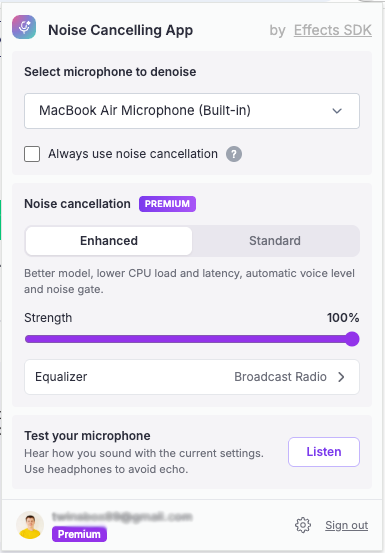
Keep standard AI noise suppression for free, or unlock a full sound-control panel for your best voice yet.
$4.95/ month
$59.95 billed annually
$9.95/ month
Billed monthly. Cancel anytime.
Install the extension to upgrade or manage Premium directly from its interface.
Choose the noise cancellation tool built for your exact task: your microphone, a recorded file, or the audio you hear.
Your live microphone
Remove background noise from what other people hear during your calls, streams, and recordings.
Explore this toolRecorded audio & video
Clean the audio track in selected media files locally, preview the difference, and export the result.
Explore this toolBrowser playback
Remove noise from what you hear in videos, streams, meetings, and podcasts across browser tabs.
Explore this toolEverything you need to know about clearer microphone audio.
Still need help? Contact supportNoise Cancelling App is an AI-powered Chrome extension that removes background noise from your microphone in real time. It creates a virtual microphone called “Background Noise Remover” that you can select in calling, streaming, and recording tools to transmit cleaner voice audio.
Yes. Standard AI microphone noise suppression is available for free. An optional Premium plan adds an enhanced AI model, adjustable suppression strength, auto gain and noise gate, a microphone test, equalizer presets, lower CPU load and latency, and an ad-free extension.
It works with microphone-enabled websites and browser-based tools, including Google Meet, Zoom, Discord, Twitch, and YouTube Live. Open your tool’s audio settings and select “Background Noise Remover” as the microphone.
The AI is designed to reduce common distractions such as keyboard clicks, background voices, barking dogs and other pet sounds, traffic, weather, fans, mechanical sounds, and hardware hiss while prioritizing the speaker’s voice.
Install the extension, choose the microphone you want to denoise, then open your meeting or recording website. In its audio settings, select “Background Noise Remover” as your microphone and refresh the page if needed.
No special microphone is required. You can use your built-in, USB, or headset microphone. Headphones are recommended when testing your microphone to avoid echo, but they are not required for noise cancellation.
Noise Cancelling App is currently available as a Chrome extension. Native desktop and mobile apps are planned as the product expands to more platforms. This website will be updated when those versions become available.
Confirm that “Background Noise Remover” is selected in your meeting or recording app, check the microphone selected in the extension, make sure the website has microphone permission, then refresh the page or rejoin the meeting. Premium users can also use the built-in microphone test.
Join clearer calls, better streams, and distraction-free recordings with AI noise cancellation for Chrome.
Add to Chrome — Free